




Don't forget modest!"reputation".... and here I always thought I was quite nondescript..... lol...

Follow along with the video below to see how to install our site as a web app on your home screen.
Note: This feature may not be available in some browsers.
Don't forget modest!"reputation".... and here I always thought I was quite nondescript..... lol...

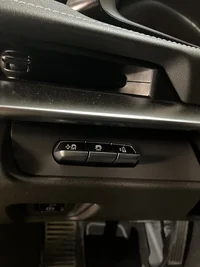
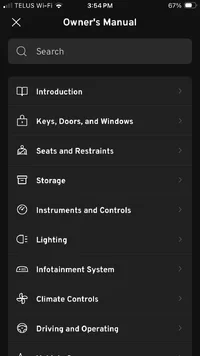
Do you have the new dash?So the MyChevy ap has the WORST owners manual I have ever had the displeasure of perusing. Pages and pages describing warning lights…nothing telling you what controls do what. I clicked the “purchase printed manual” button: unavailable. What are these 3 buttons? I assume one is stability control, one is traction control…no idea on the right one. These are above my left knee in this car.
It’s apparently the new dash…Do you have the new dash?
On my 2020 it's for the HUD.

Did you not get a hard copy with your car ? Ignore that it says site maintenance. It's the link to the 2026 owners manual in pdf if you don't already have it.So the MyChevy ap has the WORST owners manual I have ever had the displeasure of perusing. Pages and pages describing warning lights…nothing telling you what controls do what. I clicked the “purchase printed manual” button: unavailable. What are these 3 buttons? I assume one is stability control, one is traction control…no idea on the right one. These are above my left knee in this car.

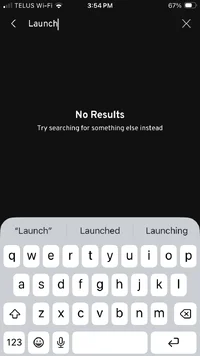
The right one looks like the button to adjust launch control RPM.So the MyChevy ap has the WORST owners manual I have ever had the displeasure of perusing. Pages and pages describing warning lights…nothing telling you what controls do what. I clicked the “purchase printed manual” button: unavailable. What are these 3 buttons? I assume one is stability control, one is traction control…no idea on the right one. These are above my left knee in this car.
Do you have the Z51 option? that left button looks like you can go toggle through the various traction control settings when in Track mode (wild guess).It’s apparently the new dash…
I went and grabbed the fob and fired it up…the right button is launch control (and with 124km apparently It’s disabled, lol…I get it).
The middle button turns off and on traction control. The left button didn’t appear to do anything.
I don’t seem to have any buttons or access to HUD. But there is something there. When the car is started there are 5 or 6 red warning logos reflected in the windshield. Mine is the cheapo LT1…so probably doesn’t have full HUD.
No hard copy. Just a quick start useless pamphlet in the glove box telling you to load up the MyChevy ap for a manual. Thanks for the link!Did you not get a hard copy with your car ? Ignore that it says site maintenance. It's the link to the 2026 owners manual in pdf if you don't already have it.
No Z51…but now that I can peruse a real manual, you are correct for both those buttons. I have to get another 700km on ‘er before I get to try…and it’s snowing again….Do you have the Z51 option? that left button looks like you can go toggle through the various traction control settings when in Track mode (wild guess).

Snowing here in Pine Lake as well... Don't fret. Spring appears to forecasted for next month....No Z51…but now that I can peruse a real manual, you are correct for both those buttons. I have to get another 700km on ‘er before I get to try…and it’s snowing again….


All are good ideas: rock/mud guards from ACS as well as jacking pucks, screens for front and a tow hook. I ordered a towing hook from Amazon - it was crap. You get what you pay for IMHO.As mentioned in the title, what are the first couple of things an owned should do to the new ride? I have the car getting PPF on the front now. I see that finer bug screens for the front AC condenser grills is a popular mod. I also like the idea of rock guards/mud flaps. I see Chevy is very proud of these components in the accessory catalogue. Any issue with ones that are 1/8 the price from Amazon? Any preferences?
I guess a guy will also need pucks in order to use a jack. Are there additional lifting locations so a jackstand can be used? Seems silly if there are only 4 lifting points...not everyone has a lift in the garage. Well, I don't. On my Hellcat I lifted it on the pinch welds (which was acceptable) then supported it with jackstands on the lifting points underneath.

Geeeezzzzzz those pucks have really come up ...... I bought the exact same ones in '21 on Amazon ...... and paid them like 25 bucksThese lift pucks are prefered by many here.
Potauto Universal Aluminum Jack Pad Jacking Puck Adapter Support | Compatible with Corvette C6 C7 Porsche 911 996 Frame Rail Vehicles (4-Pack, Red), Vehicle Lifts, Hoists & Jacks - Amazon Canada
Potauto Universal Aluminum Jack Pad Jacking Puck Adapter Support | Compatible with Corvette C6 C7 Porsche 911 996 Frame Rail Vehicles (4-Pack, Red) in Vehicle Lifts, Hoists & Jacks.www.amazon.ca
Get some snows and be like JR?Snowing here in Pine Lake as well... Don't fret. Spring appears to forecasted for next month....
Be sure to get the tow hooks that can be use for both front/rear.All are good ideas: rock/mud guards from ACS as well as jacking pucks, screens for front and a tow hook. I ordered a towing hook from Amazon - it was crap. You get what you pay for IMHO.
errrrr.... Not a chance....Get some snows and be like JR?
My 24 did come with a hard copy . Perhaps they are trying to save some trees now . Or they are just cheap swine..............No hard copy. Just a quick start useless pamphlet in the glove box telling you to load up the MyChevy ap for a manual. Thanks for the link!
(My 2023 Ford work truck never came with one either)

Same thread.Be sure to get the tow hooks that can be use for both front/rear.
We would feel your pain up here if our hands weren't so numb.........Snowing here in Pine Lake as well... Don't fret. Spring appears to forecasted for next month....
On the 24' at least those 3 are for adjustment of the HUD .Do you have the Z51 option? that left button looks like you can go toggle through the various traction control settings when in Track mode (wild guess).