Navigation
Install the app
How to install the app on iOS
Follow along with the video below to see how to install our site as a web app on your home screen.
Note: This feature may not be available in some browsers.
More options
Style variation
You are using an out of date browser. It may not display this or other websites correctly.
You should upgrade or use an alternative browser.
You should upgrade or use an alternative browser.
Download track file
- Thread starter Z Monsta
- Start date





Definitely check the PDF manual and do a search in there. But, when I did the Ron Fellows training, they said that if the track is not already in their system (which Cayuga likely won't be), there is a way for you to put the PDR into a 'read' mode where you do a warm up lap, indicating where the start is. From there, it'll create the custom track. And you should be able to save that so you can go back to it too. Never done, but it is possible.
- Thread starter
- #3
Thanks, yes I saw the option to learn a track. Very neat. Not sure if I will get a chance to do that on the day of but I’ll try. Maybe I’ll try that feature out first around my neighborhood.
There are zero tracks loaded already. It gave me some message about downloading elsewhere. I don’t have the car with me this week so I’ll check it out as soon as I get the car back.
There are zero tracks loaded already. It gave me some message about downloading elsewhere. I don’t have the car with me this week so I’ll check it out as soon as I get the car back.
I picked up my 2024 Stingray last year and have planned to take mine to Cayuga and Mosport as well. First time doing this for me. The people at Ron Fellows really emphasized how important it is to make the adjustments to the car before tracking it... brake fluid, transmission fluid and camber of the tires. Are you planning on doing this before you go? Let me know when and where you're going and I'll see if I can make it work to be there too.
- Thread starter
- #5
I picked up my 2024 Stingray last year and have planned to take mine to Cayuga and Mosport as well. First time doing this for me. The people at Ron Fellows really emphasized how important it is to make the adjustments to the car before tracking it... brake fluid, transmission fluid and camber of the tires. Are you planning on doing this before you go? Let me know when and where you're going and I'll see if I can make it work to be there too.
Attachments
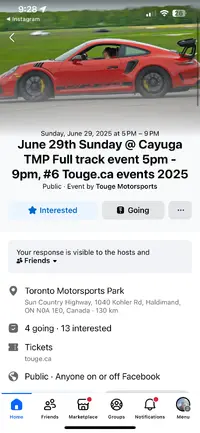
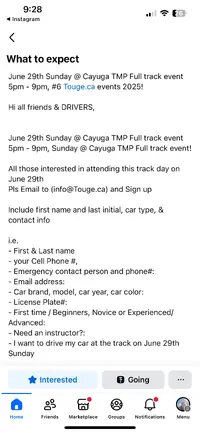
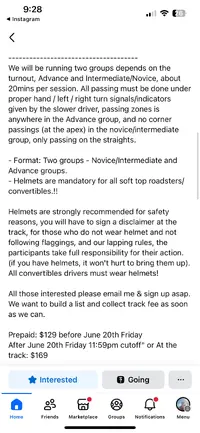
- Thread starter
- #6
There is the info about the event. I’m going to be taking it very easy as it’s my first time. I already have the extra 2 quarts for dct. Not gunna touch the camber unless I go to Mosport. As 99% of my driving is commute.

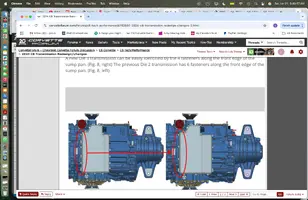
Are you certain about the extra 2 litres for the transmission? It was changed late '23 ( July 17), vin 7263. Tag on transmission should be M1M. The revised transmission doesn't need the extra fluid. The new transmission has 4 bolts along the front of the sump panThere is the info about the event. I’m going to be taking it very easy as it’s my first time. I already have the extra 2 quarts for dct. Not gunna touch the camber unless I go to Mosport. As 99% of my driving is commute.
Attachments
Last edited:
- Thread starter
- #8
Yes you are right… I double checked with dealer 2 quarts already in. They said z06 already has.
Are you certain about the extra 2 litres for the transmission? It was changed late '23 ( July 17), vin 7263. Tag on transmission should be M1M. The revised transmission doesn't need the extra fluid.

I just came back from Spring Mountain on Friday. What they said is that if you are not tracking the car a lot then do not use the track setting. Track setting will wear the tires at a greater rate. Interesting they also told us that by adding the two quarts it reduces your times.






Downloading Track Layouts for the C8 Corvette PDRHi,
Does anything know how and where to download the files necessary to load into the c8 pdr system. So it can track lap times?
I’m looking for Cayuga and Mosport
You can download ready-made track layout files (GPX format) for the C8 Corvette’s Performance Data Recorder (PDR) from several community resources:
• HiPo Driver offers a large collection of PDR2-compatible track finish line definitions. Simply extract the downloaded ZIP file and place the included `map.gpx` file in the root directory of your SD card for use in your C8 Corvette. This site is frequently recommended by the Corvette community for PDR track maps.
• The MidEngineCorvetteForum and similar forums sometimes host user-uploaded track map files, especially for tracks not widely available elsewhere. These are typically bundled in ZIP files and can be placed directly on your SD card.
• If you can’t find a specific track, you can create your own GPX file using Google Earth or similar tools, or ask in Corvette forums where some users offer to generate custom files for you.
Once the GPX file is on your SD card, insert it into your Corvette and the PDR should recognize the track layout automatically.
Tip: The PDR can also “learn” a new track using its built-in GPS if no map is available, but pre-made files save time and ensure accurate start/finish points.
For those that may not know…..
The root directory of a USB drive is the top-level folder of that drive’s file system. When you plug in your USB and open it (for example, as “D:” or “E:” in Windows), the window that appears is the root directory. This is where all files and folders on the USB are stored directly, not inside any sub folder.
Similar threads
-

-
September 7th Labour Day Longwkend Monday 9am-5pm Touge.ca Mosport DDT Track Event#13
- Started by z06C7R
- Replies: 0
-
Users who are viewing this thread
Total: 1 (members: 0, guests: 1)